

Table of Contents
Authentication is one of the first problems every system must solve. Before we talk about Single Sign-On, we need to understand how identity is established and how that model evolves as systems grow.
Let’s assume I own a social media platform and need to design its authentication model from scratch. We’ll build it step by step, allowing each layer to emerge naturally from the limitations of the one before it.
Level 1 — Basic Password Authentication
At the most fundamental level, users register with an email and a password. When they log in the next time, our backend verifies the credentials against stored records in the database. If the password matches, the user is authenticated and allowed to access the system.
At this point, authentication simply means verifying identity using credentials stored in our own system.
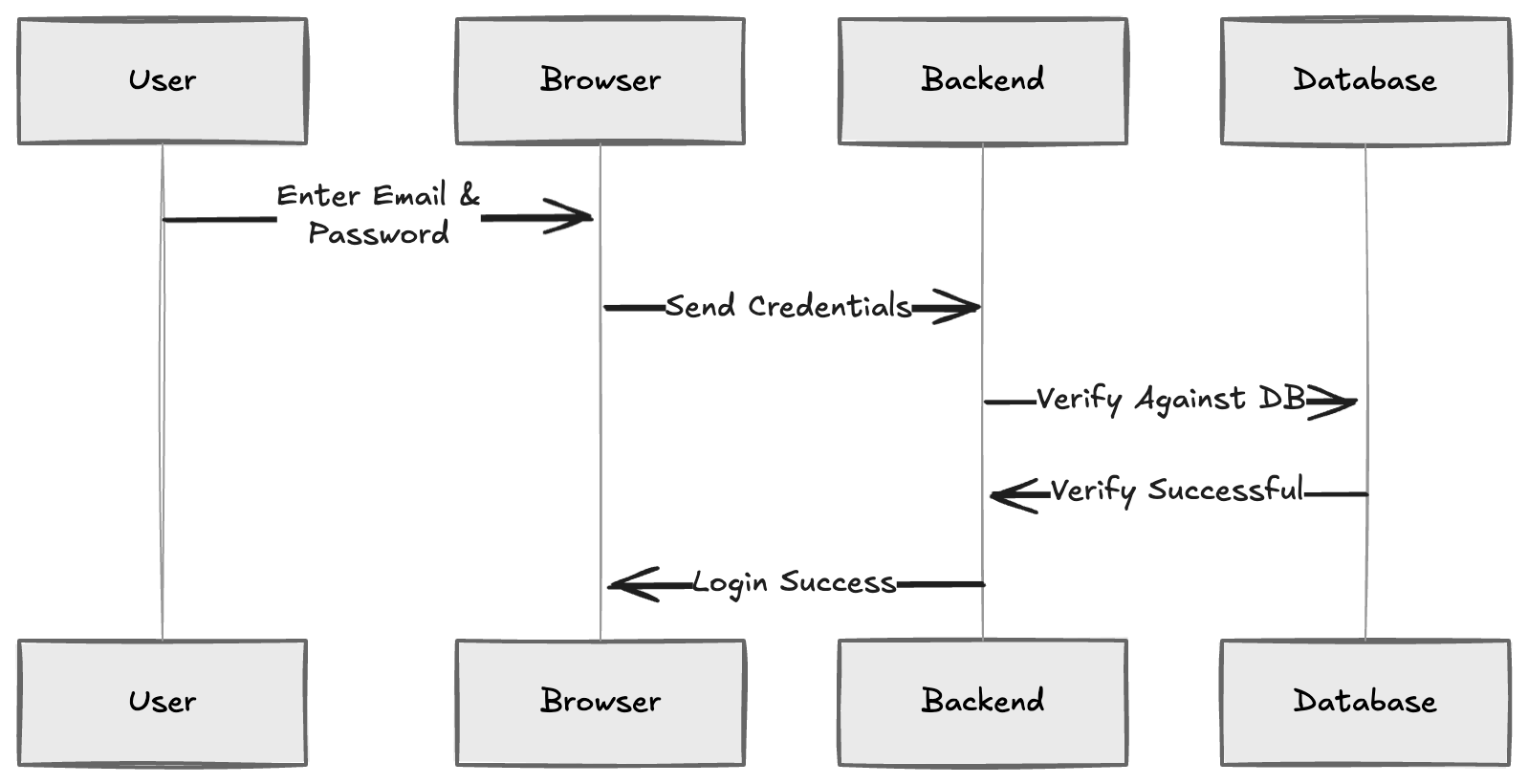
This is the simplest possible model. Everything is managed internally.
Level 2 — Introducing Sessions and Tokens
At Level 1, we verified the user’s email and password. Once the backend confirms the credentials are correct, the user is considered authenticated.
Now a new problem appears.
After login, the user starts interacting with the application. They load their feed, messages, and so on. Every time they click something, the browser sends a request to the backend API.
For example: curl GET /feed GET /messages
The backend must know which user is making each of these requests. A naive approach might be to send the user’s identity directly in the URL: GET /feed?user_id=42 At first glance, this seems simple. The backend sees user_id=42 and returns the corresponding feed. But this is insecure.Anything sent from the browser can be modified. So, a user could simply change the URL to: GET /feed?user_id=1
If the backend blindly trusts this value, the user could access someone else’s data. This is the core problem, the browser cannot be trusted to declare identity.
So instead of trusting the browser to tell us who the user is, the server creates proof of identity. After successful login, the backend generates either:
- A session ID
- Or a signed token
For example, the backend might create: session_id = 4f9c2e8a7b1d4c6f9e2a0b7c3d5e8f1a This session ID is stored on the server and sent back to the browser as a cookie. Now, for every subsequent request:
GET /feed
Cookie: session_id=4f9c2e8a7b1d4c6f9e2a0b7c3d5e8f1a
The backend doesn’t have to trust the browser’s claim about user identity. The identity comes from the server’s memory, not from the browser. Instead, it looks up 4f9c2e8a7b1d4c6f9e2a0b7c3d5e8f1a in its own session store and finds:
| session_id | user_id |
|---|---|
| 4f9c2e8a7b1d4c6f9e2a0b7c3d5e8f1a | 42 |
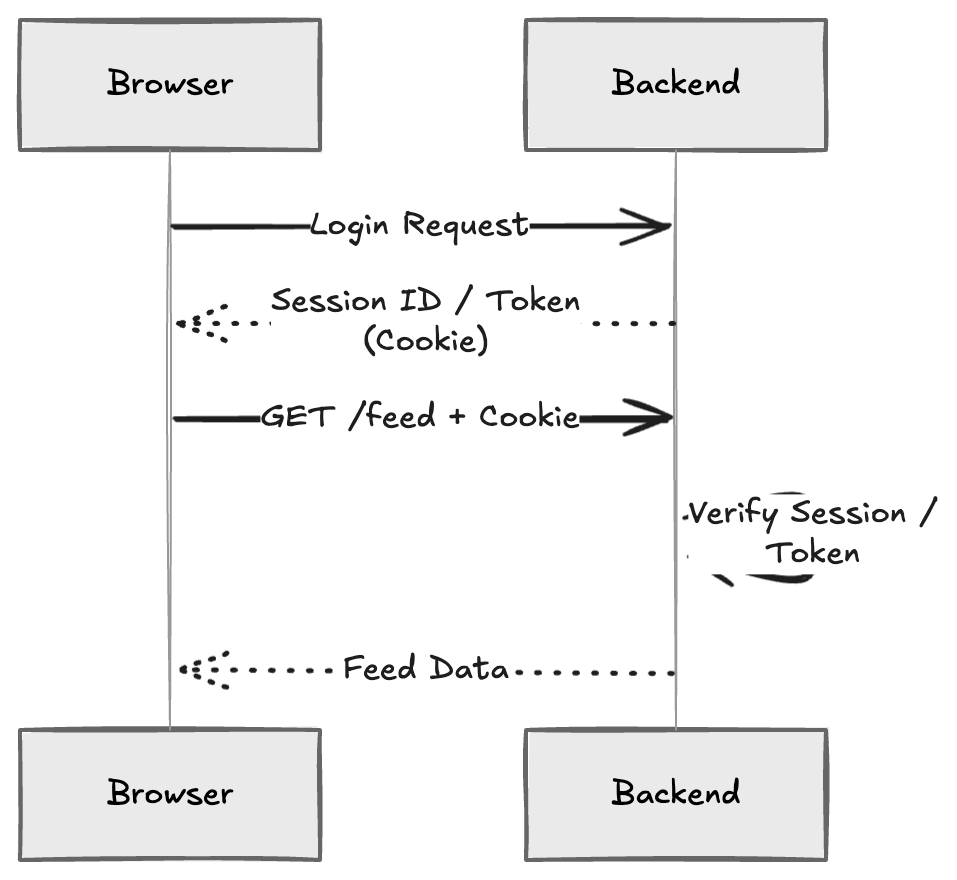
If we use a token instead of a session, the idea is similar. The token is digitally signed by the server. The backend verifies the signature and extracts the user identity from it (If the token has been tampered with, the signature validation fails) In both cases, the key idea is this: The server creates identity proof. The browser only carries it. The backend verifies it.
This is the moment where we move from simple login to a proper stateful application. Identity is no longer declared by the client. It is issued by the server and verified on every request.
Level 3 — From Self-Managed Authentication to Federated Authentication
At Level 2, our backend verifies passwords and generates sessions or tokens. That means we are fully responsible for authentication. We store user passwords (usually hashed). We verify credentials. We manage sessions. At this stage, our system works. But as the product grows, users expect more than just basic login.
They expect:
- Password reset via email
- Email verification
- Multi-factor authentication (MFA)
- Protection against brute-force attacks
- Session expiration policies
- Account recovery flows
Building all of this securely requires significant expertise. More importantly, we are directly handling user passwords. If anything goes wrong, the security liability is ours. If we choose to build all of these features ourselves, we are effectively building an authentication server from scratch. That means we are responsible for designing, securing, scaling, and maintaining a complete authentication server.
For most companies, it often makes more sense to consider outsourcing authentication rather than building and maintaining this entire system internally. Instead of verifying passwords ourselves, we delegate authentication to a specialized external service called an Identity Provider (IdP).
If we use an external IdP, the flow changes. Instead of sending credentials to our backend, the user is redirected to the IdP’s login page.
After successful authentication, the IdP redirects the browser back to our backend with an authorisation code. The backend receives this code at a callback endpoint and exchanges it directly with the IdP. In return, the IdP issues an ID token, which proves the user’s identity. The backend verifies the ID token is valid and establishes a session for the user.
Here is what that looks like:
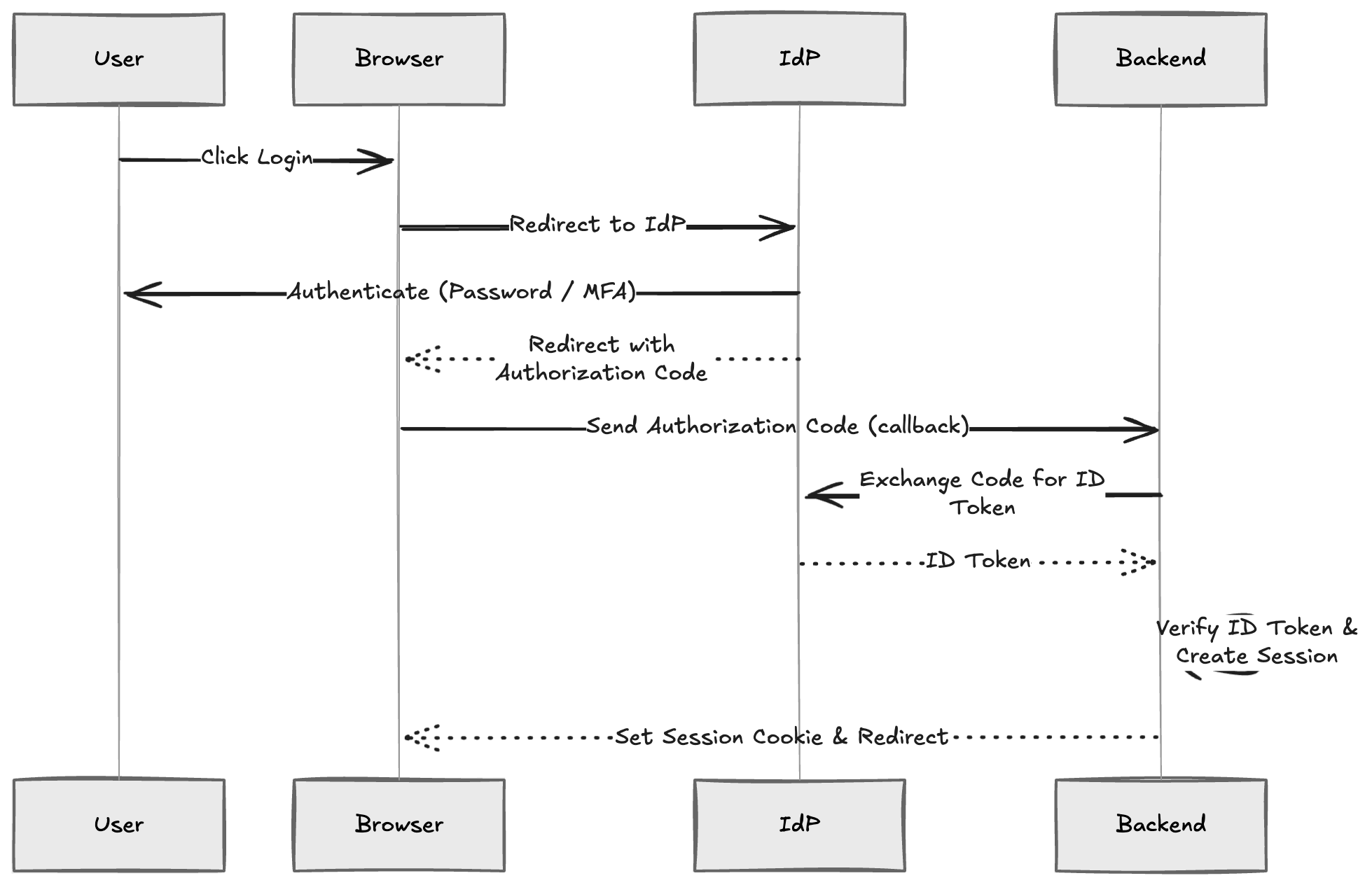
The important change is this: We no longer store or verify passwords. Authentication is Centralized at the IdP. Our backend only verifies the ID token.
This model is called federated authentication because we trust an external identity provider to authenticate users on our behalf. We have now moved from a self-managed authentication system to a federated identity model.
Level 4 — Single Sign-On (SSO)
Now imagine we build a new companion application: an analytics dashboard for verified creators.
A creator logs into the main social media website in their browser. Later, when they click a link to open the analytics dashboard. They are instantly logged in. No email. No password. No second login screen.
They move from the main website to the dashboard seamlessly. This is Single Sign-On (SSO), and this is the real payoff of Centralizing identity.
When the user logs in to the main website, authentication happens at the Identity Provider. During that process, the IdP creates its own session and stores a secure session cookie in the user’s browser as discussed in Level 3. Later, when the analytics dashboard redirects the browser to the IdP for authentication, the browser automatically includes the IdP’s session cookie in that request. The IdP checks whether the session is still valid. If it is valid, the IdP skips the login screen and immediately issues a new authorisation code for the dashboard.
Here is the flow:
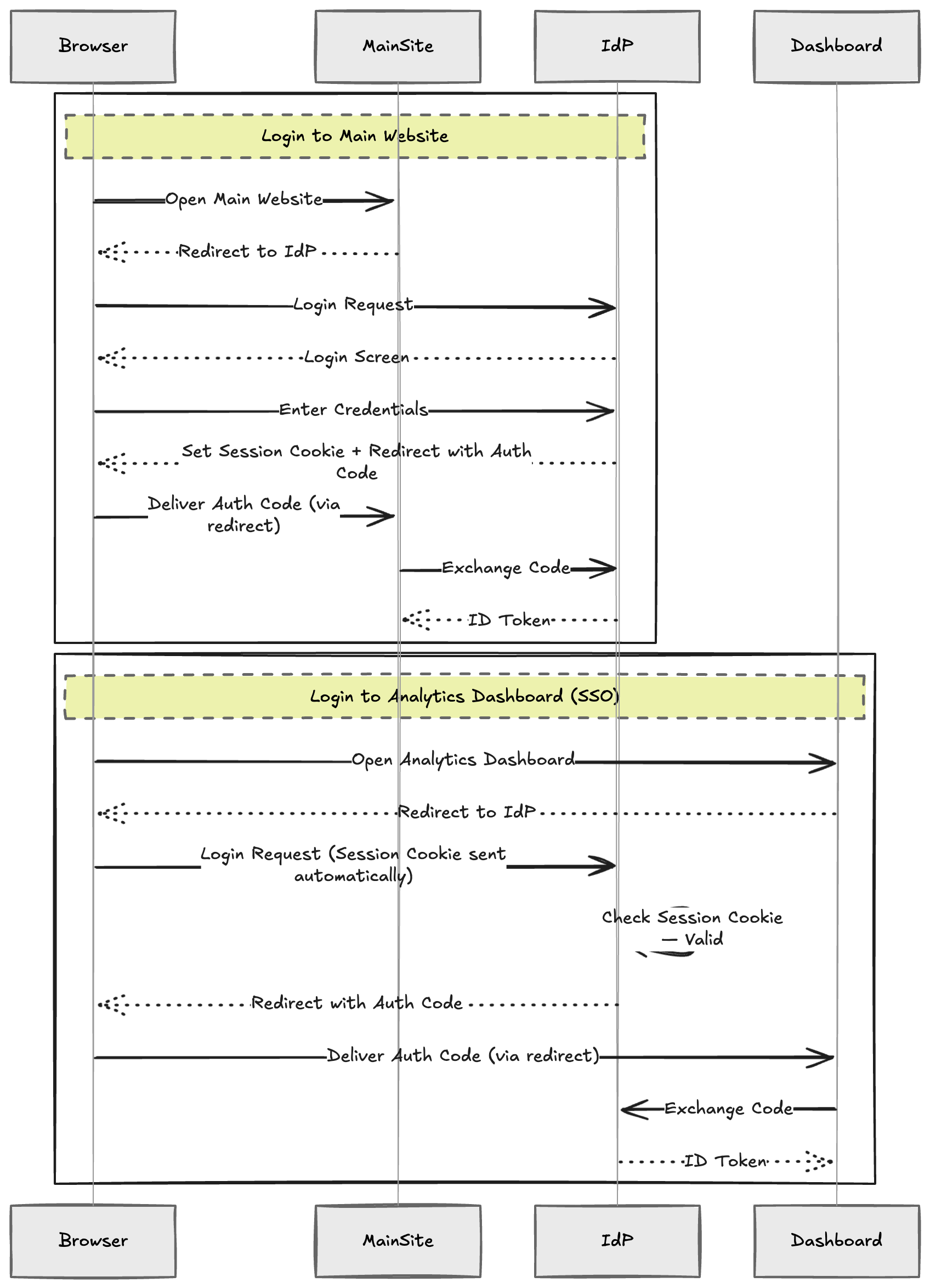
The important idea is this:
Authentication happens once at the Identity Provider. The IdP maintains the login state using a secure session cookie, and all trusted web applications that rely on that IdP benefit from the same shared session.
By Centralizing identity, we reduce repeated logins, simplify application integration, and provide a seamless user experience without weakening security.
The architecture has now matured into a modern identity model:
- Centralized identity management
- Federated authentication
- Single Sign-On
What began as a simple password check evolved step by step into a scalable authentication system. Sessions and tokens made identity persistent and verifiable. Federated authentication removed the burden of managing credentials. Centralizing identity enabled seamless access across applications.
Authentication is no longer just about checking a password. It is about structuring identity and scaling it securely across applications, as the platform grows.